responsive template arena seems it is becoming a commodity for Blogger, this time I relented. Although from the beginning I did not care about the display is responsive, would not want to have to adjust to the market in order to survive in an increasingly competitive world of competitive Blogger. As I wrote in the previous article, for those who do not use a display responsive, nor hold insecure or rush will change the template. Consider carefully first before you change the template. Too often you change the template, it is not good for your blog in Google's eyes. Many articles that discuss it, please find yourself on Google.This time I am going for another 2 pieces display a simple template with a responsive, at least that's my opinion. Since I made this template only with one computer jadul often hangs when hot and of course internet connection, as well as responsive facility cheker betebaran many free online on the internet. I could not check in here directly via the mobile phone, because of technology and the quality of my phone does not allow for it. So the problem is I do not guarantee the accuracy responsivitasnya hundred percent, you simply check yourself through your mobile phone.
Johny Ajaib
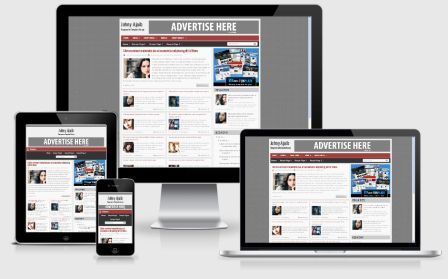
Johny Ajaib
It only Company that could magical? Johny also, is proof of this template I love the name of Johnny Wonder. This template can also be regarded as a token of appreciation to my Adhy Kang Magic Company blog owner. On the home page template, I combine two display models, the first is the display readmore blogger uses javascript as usual displaying only 1 piece of post, with the content of the widget displays a champion Taufik Nurrohman Blogger Indonesia http://www.dte site owner. web.id.
It meant that I preview or preview feature on blogger can function without having to hide the post on the home page, and the second to anticipate search engines in reading the code in the template structure. Because if you just put a post in the form of a link that is built from javascript on the front page, it will not be read or ignored by search engines, and of course it's not good for SEO. Something like that I captured from one Taufik Kang comment on an article. (please corrected if wrong).
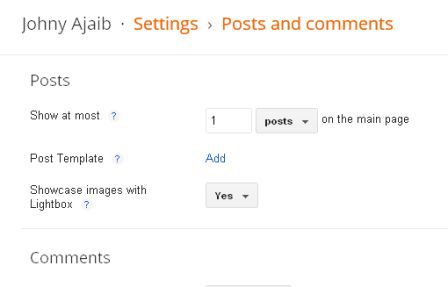
For customization recent post at the top, please go to settings >> posts and comments >> show at mosts, select the number / number 1 (if you want to look like in the demo), as shown below:
You can change the number of posts it as you wish. But it must be remembered, you have to adjust well to the number of posts display widget content underneath it to prevent double post on the home page. The trick, consider this code in the Edit HTML (check expand widget templates):
for(var o=1;o<postsperpage;o++)
Note the yellow numbers above, adjusted by the number of shows at most that you choose. And for setting the widget content, find the following code in the Edit HTML (check expand widget templates):
var showPostDate = true,
showComments = true,
idMode = true,
sortByLabel = false,
labelSorter = "",
loadingText = "Loading...",
totalPostLabel = "Total Post :",
jumpPageLabel = "Page",
commentsLabel = "Comments",
rmoreText = "Read more ►",
prevText = "Prev",
nextText = "Next",
siteUrl = "http://johny-ajaib.blogspot.com/",
postsperpage = 9,
numchars = 160,
imgBlank = "https://blogger.googleusercontent.com/img/b/R29vZ2xl/AVvXsEj1D2-hNUKc4LYi3_LZy4_h7KBgEs0F2PS0OsFhr3lPd7ai8e_TcEwhOnOTw8Ahj4gbQdIvIEvS19ZjgNLKf4G8lGkAUDtoE2pCy5_VkZbrANMi5aVvSgEbIqjSM3sFrmodtkOR-gLK12g/s1600/no+image.jpg";
Red color: Replace with your blog URL
Color Green: Number of posts overall on the home page.
Color Blue: The number of characters in the widget content.
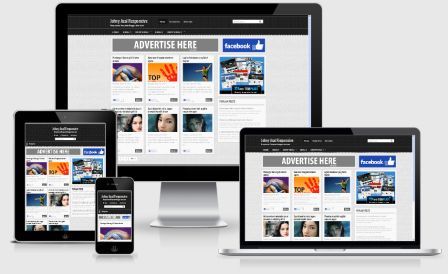
Johny Asal Responsive
Note:
Some articles on this template demo high doses, for those who can not accept the difference of opinion should not be read
As the name suggests, an important responsive, you want to wear or baseball is an important template responsive. Probably about that was in my mind while making this template. There is nothing new, nor is there a tutorial specifically for this template. Of note, it is advisable to wear an image on each post you make. And every picture that you have included in this post should be uploaded on Blogger, not stored on other sites let alone copy image URL from another blog.
That was 2 template responsive I share this time. Please download for those who like or are interested in, who knows after using this template you get a reward for 2 weeks vacation to Hawaii or Paris, so who knows because if God willing, nothing would happen. Above all the tutorials I've included both temlplate way for the installation. If there is still not clear, please leave a message in the comments box below. Good luck and good night .......


0 comments:
Post a Comment